Integrating the Fall Paper Leaves Template into Your Autumn Creative Workflow
As the seasons shift, so do the demands on creative professionals, small business owners, and hobbyists alike. The transition into autumn brings a surge in demand for seasonal decor, educational materials, and personalized gifts. Successfully navigating this period requires more than just inspiration; it demands a streamlined process that balances aesthetic quality with production efficiency. This is where a robust digital asset like the Fall Paper Leaves Template becomes an essential component of your workflow. Rather than viewing these files merely as static images, consider them functional tools designed to integrate seamlessly into various stages of project planning, execution, and final delivery.
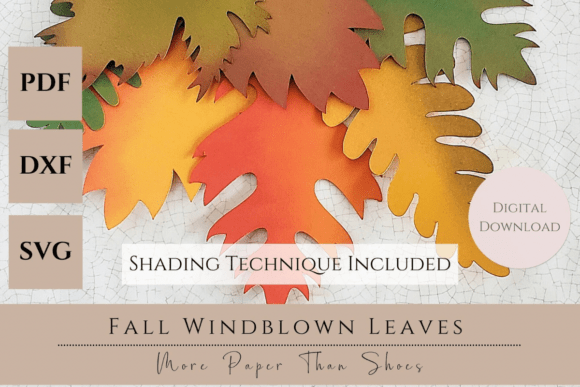
The core value of the Fall Windblown Leaves digital collection lies in its versatility and technical compatibility. In a professional or semi-professional setting, time spent troubleshooting file formats or redrawing elements is time lost. This collection addresses those friction points by providing a comprehensive suite of file types: PDF for immediate printing and hand-cutting, DXF for Silhouette machines, and SVG for Cricut-compatible cutters. By having these formats ready at the onset of a project, you eliminate the preparatory phase of file conversion, allowing you to move directly from concept to creation. This readiness is crucial when managing tight deadlines for client orders, classroom activities, or seasonal product launches.
Strategic Preparation and Asset Organization
Effective implementation begins before the first cut is made. Integrating the Fall Paper Leaves Template into your routine starts with proper asset management. When downloading the collection, which includes the primary design files and a specialized shading technique tutorial, organize these immediately into a dedicated project folder. This practice ensures that when you are in the midst of a high-volume production run—such as creating fifty invitations or a series of home decor centerpieces—you are not searching for instructions or compatible files.
The inclusion of the shading technique tutorial is a critical resource that bridges the gap between digital design and physical texture. Many creators struggle to make flat paper elements look organic and three-dimensional. By reviewing this tutorial during the planning phase, you can determine your color palette and material requirements in advance. Will you be using solid cardstock for bold pops of color, or textured kraft paper for soft rustic tones? Deciding this early prevents material waste and ensures consistency across all units of your project. This foresight is a hallmark of efficient workflow management, reducing the need for mid-project pivots that can derail timelines.
Adapting to Different Production Methods
One of the distinct advantages of this template collection is its adaptability to different production environments. Whether you are operating a solo home-based business, managing a classroom of students, or coordinating a large-scale event, the workflow adjusts to your specific constraints.
For those utilizing automated cutting machines like Cricut or Silhouette, the SVG and DXF files offer precision and speed. In a business context, this allows for rapid prototyping. You can quickly test how the windblown foliage looks at different scales before committing to a full production run. The clean vector paths ensure that intricate details of the leaf veins are captured accurately, maintaining a high standard of quality control. Once the design is validated, the machine can run continuously, producing hundreds of identical elements with minimal supervision. This scalability is vital for entrepreneurs looking to maximize output during the short autumn selling window.
Conversely, for educators or community leaders organizing group craft sessions, the PDF file serves as the primary tool. Hand-cutting activities foster engagement and fine motor skill development, making them perfect for classroom projects or workshop settings. Here, the workflow shifts from automation to facilitation. The template provides a consistent base shape for all participants, ensuring that even with manual cutting, the final collective display—perhaps a large fall banner or garland—maintains a cohesive look. The "windblown" aesthetic of the designs naturally hides minor imperfections inherent in hand-cutting, making it a forgiving and user-friendly choice for diverse skill levels.
Enhancing Realism Through Technique
A common pitfall in paper crafting is the "flat" appearance of the final product. The Fall Paper Leaves Template addresses this through its specific design philosophy and the accompanying shading instructions. The natural flow of the windblown foliage is engineered to look dynamic, but the addition of depth through shading transforms these shapes into realistic botanical elements.
Implementing the shading technique should be viewed as a distinct step in your production line. If you are creating junk journals or scrapbooking layouts, applying these gradients before assembly allows the ink or pastel to dry fully, preventing smudging on adjacent pages. For 3D projects like centerpieces or wreaths, shading adds the necessary shadow and highlight definition that mimics how light interacts with real leaves. This attention to detail elevates the perceived value of the finished item. For marketers and bloggers showcasing their work, this added realism translates into higher-quality photography and more engaging social media content, driving better audience interaction.
Integration Across Diverse Use Cases
The utility of these templates extends far beyond simple decoration. Understanding where they fit in broader workflows opens up new avenues for application.
- Small Business & Retail: Use the templates to create seasonal packaging accents, gift tags, or window displays. The consistency of the digital files ensures brand uniformity across all customer touchpoints.
- Education: Incorporate the leaves into biology lessons about deciduous trees or history projects regarding harvest traditions. The PDF format allows for easy duplication for entire classes without additional cost per unit.
- Event Planning: Design cohesive table settings, place cards, and photo booth props. The ability to scale the SVG files means you can create everything from tiny confetti to large backdrop elements from the same source file.
- Content Creation: Bloggers and publishers can use the printed and shaded leaves as physical props for flat-lay photography, adding authentic seasonal context to articles and product reviews.
In each scenario, the template acts as a foundational asset. It reduces the cognitive load of design, allowing the creator to focus on arrangement, composition, and storytelling. This separation of concerns—using pre-made, high-quality assets for the base elements while dedicating mental energy to the unique aspects of the project—is a key strategy for maintaining productivity.
Quality Control and Long-Term Usability
Sustainability in a creative workflow isn't just about materials; it's about the longevity of your digital resources. The Fall Windblown Leaves collection is designed for repeated use. Unlike a physical stencil that wears down or tears, these digital files remain pristine indefinitely. You can revisit them year after year, adjusting colors or techniques to match evolving trends without needing to purchase new assets. This long-term usability offers a significant return on investment for freelancers and business owners who need to manage overhead costs effectively.
Furthermore, the compatibility of the files ensures future-proofing. As software updates or new cutting machines enter the market, standard formats like SVG, DXF, and PDF remain universally supported. This reduces the risk of obsolescence, ensuring that your library of templates remains a reliable part of your toolkit for years to come. Regularly auditing your digital assets and ensuring they are backed up alongside your project files is a good habit to maintain, safeguarding your ability to replicate successful past projects efficiently.
Final Thoughts on Execution
Bringing the beauty of autumn indoors is a goal shared by many, but achieving professional results requires a methodical approach. The Fall Paper Leaves Template collection simplifies this journey by providing the technical foundation needed for success. By leveraging the included file formats and mastering the shading techniques, you can produce work that stands out for its realism and attention to detail.
Whether you are cutting hundreds of leaves for a commercial order or guiding a group of students through a creative afternoon, the principles of preparation, compatibility, and technique remain constant. Integrate these templates into your existing systems, respect the process of shading and assembly, and you will find that your autumn projects not only look better but are also completed with greater ease and confidence. The result is a seamless blend of artistic vision and practical execution, perfectly capturing the essence of the season.